The Fox Icon in Vector Design: A Practical Guide to Its Use and Alternatives
When building a brand identity, designing a website, or creating infographics, the choice of iconography often shapes how users perceive the entire project. Among the many symbols available, the fox icon stands out for its blend of cleverness, agility, and visual appeal. But not all fox icons are created equal, and selecting the right one involves more than just picking a pretty shape. This article takes a balanced look at the Fox Icon from the wild animals collection, examines how it compares with similar icon styles, and helps you decide when it suits your project — and when another approach might serve you better.
What Makes the Fox Icon Distinct
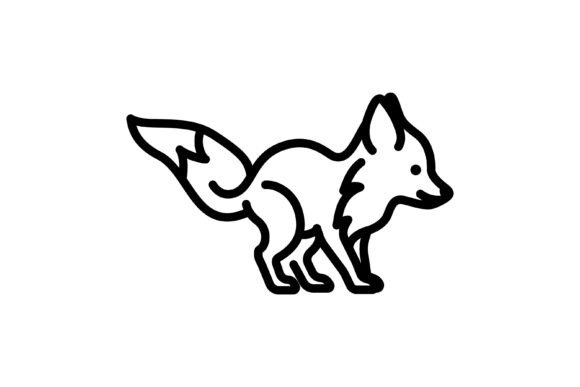
The Fox Icon described here comes from a dedicated wild animals collection and is presented as a simple line vector graphic. At first glance, the most noticeable feature is its clean, minimal line style. Unlike highly detailed or shaded icons, this version relies on crisp outlines to convey the animal’s form. The simplicity makes it highly adaptable for templates, web interfaces, and infographics where clarity at small sizes matters.
Because the icon is fully vector-based and organized with editable text, shapes, and colors, you have considerable flexibility. You can change the stroke weight, adjust the color palette, or scale the icon up to billboard size without losing sharpness. The file comes in AI, EPS, JPG, and SVG formats, all at 300 dpi resolution. This combination of format variety and resolution support means the icon can move seamlessly between print and digital workflows.
Another distinctive aspect is the style itself. A simple line fox icon tends to evoke a modern, clean aesthetic. It fits well with flat design, minimal branding, and contemporary infographic layouts. The line style also simplifies integration with other line-based icon sets, making it easier to maintain visual consistency across a project.
Comparing the Fox Icon with Similar Icon Styles
When evaluating the Fox Icon, it helps to place it alongside other common icon approaches. The table below outlines key differences without naming specific competitor products.
| Icon Style | Key Characteristics | Best Use Cases | Tradeoffs |
|---|---|---|---|
| Simple line vector (as in this Fox Icon) | Clean outlines, minimal detail, high scalability | Web UI, mobile apps, infographics, logo concepts | May lack visual depth for print or large displays; less suitable for highly realistic needs |
| Filled or solid icon | Bold shapes, often monochromatic or limited color | Buttons, navigation bars, icons at very small sizes | Can appear heavy; less flexibility for color variation |
| Detailed or illustrated icon | Rich shading, textures, multiple colors | Hero images, posters, elaborate infographics | Larger file size; may not scale down cleanly; harder to edit |
| Flat color vector | Solid areas of color without gradients | Modern branding, character icons, playful designs | Can feel less refined if not carefully crafted |
As the table shows, the simple line vector style occupies a specific niche. It offers cleanliness and adaptability that detailed or filled styles sometimes cannot match, especially when you need to maintain legibility at multiple sizes. However, if your project calls for rich texture or photorealism, a line icon will feel too sparse.
Strengths of the Fox Icon in Practice
One of the clear strengths of the Fox Icon is its versatility across different media. Because it is a simple line vector, you can easily modify the stroke color to match your brand palette, invert it for dark backgrounds, or combine it with other icons from the same collection without visual clashes. For infographics, where icons often need to represent concepts quickly, the minimal form of a fox — with its pointed ears, slender snout, and flowing tail — communicates the animal instantly without confusing detail.
Another advantage is the organized file structure. When a designer receives a vector file with editable layers, shapes, and text, they save hours of cleanup work. The product description emphasizes that the graphics are well organized, which is a practical benefit for professionals who need to adjust individual elements or apply consistent styling across a series of icons.
For logo creation, a simple line fox icon can serve as a starting point. You might trace over it, adjust proportions, or add custom typography to build a unique mark. The inclusion of SVG format further supports web usage, as SVG files have small sizes and can be styled with CSS, making them ideal for responsive design.
The 300 dpi resolution also deserves attention. While vector files are resolution-independent at their core, the provided JPG version at 300 dpi is immediately usable for print previews or fast mockups without needing a separate export step. This convenience can speed up early-stage design work.
Realistic example: Branding a wildlife-themed blog
Imagine you are designing a logo and social media graphics for a blog about urban wildlife. The Fox Icon in its simple line form could become the primary logo mark. You can set the line color to a warm orange, pair it with a clean sans-serif font, and use the same icon as a favicon at 16x16 pixels. Because the line style is minimal, it remains recognizable at that tiny size. For Instagram posts, you could place the icon over a photo with a soft color overlay. The consistency of the icon across formats reinforces brand recall without requiring a different asset for each platform.
Tradeoffs and Limitations to Consider
No icon is a perfect fit for every situation, and the Fox Icon has its tradeoffs. The most notable limitation is its simplicity. If your project requires a highly expressive or emotionally rich portrayal — for example, a children's book illustration or a detailed infographic about animal anatomy — a simple line icon may not convey enough information or feeling. In such cases, a more rendered or illustrated version might be a better choice.
Another tradeoff is that the line style, while clean, can sometimes feel generic if used without customization. Many stock icon sets offer similar line-based animals, so the risk of your design looking like many others is real. To mitigate this, you need to invest time in customizing colors, stroke weights, or adding subtle elements like a shadow or a geometric frame that ties the icon to your specific brand.
The format list (AI, EPS, JPG, SVG) is comprehensive, but note that the JPG version is a raster image. While the 300 dpi resolution ensures good print quality, a JPG cannot be scaled up infinitely like the vector formats. If you plan to use the icon primarily in print and need extremely large sizes (e.g., a banner), always work from the AI, EPS, or SVG files to maintain crisp edges.
Also, because this is a single icon from a wild animals collection, you may need additional icons to build a complete visual system. If your project calls for a set of 20 or 30 related symbols (fox, wolf, bear, deer, etc.), you will either need to purchase the full collection or source complementary icons elsewhere. Checking whether the entire set shares the same stylistic approach is essential before committing to one icon.
When the Fox Icon Is the Right Choice
The Fox Icon works best in scenarios where you need a recognizable, clean symbol that can be adapted quickly. Consider using it when:
- You are designing a logo or brand mark that should feel modern and uncluttered
- Your project involves infographics or data visualization where icons must be legible at small sizes
- You require a vector file that is already organized and ready for editing in Adobe Illustrator or similar software
- You need an icon that works across both print (300 dpi JPG) and digital (SVG, AI, EPS) without separate preparation
- Your brand voice emphasizes simplicity, agility, or intelligence — traits associated with the fox symbol
Realistic example: A mobile app for wildlife tracking
If you are prototyping a mobile app that lets users log sightings of urban animals, a simple line fox icon could serve as a category marker for fox sightings. On a small phone screen, the minimal line will remain clear. You can color-code the icon in different states (active, inactive, completed) without changing its structure. The SVG format allows you to embed the icon directly into the app code, keeping the bundle size small.
When You Might Need Another Option
There are also situations where a different icon type would be more effective. You might look elsewhere if:
- Your design requires a photorealistic or heavily textured look — a detailed illustration or photograph would carry more weight
- You need a full suite of wild animal icons that share a consistent style, and this single icon is not part of a larger purchased set
- The project is aimed at very young children, where a more colorful, rounded, or character-driven icon could be more engaging
- Your brand uses a filled or solid icon style for all other elements, and mixing in a line-style fox would break visual harmony
- You need the icon to work at extremely small sizes (below 12px) where very thin lines may become invisible or blurry
In the last case, a filled or solid icon would likely perform better. Similarly, if your infographic relies heavily on a consistent color scheme with gradients, a line icon may look disconnected from the rest of the design.
Decision Factors to Evaluate
Before finalizing your choice, consider these practical factors in relation to the Fox Icon:
- Scalability needs: If your icon will be used at both very small and very large sizes, the simple line vector is a strong candidate — just test the thinnest strokes at the smallest size.
- Customization effort: How much time are you willing to spend editing? The organized file structure reduces editing time, but you still need to choose colors and perhaps adjust proportions to fit your layout.
- Consistency across assets: Does this icon match the style of other icons you plan to use? If you are mixing sources, verify line weight, corner rounding, and overall aesthetic.
- File format requirements: Check whether your workflow prioritizes SVG for web, AI for print, or JPG for quick comps. This icon covers all those bases.
- Brand symbolism: The fox carries cultural meanings of cunning, adaptability, and intelligence. Ensure that these associations align with your brand message.
Final Thoughts on the Fox Icon
The Fox Icon from the wild animals collection represents a practical, well-prepared vector asset for designers who need a clean line symbol. Its strengths lie in its simplicity, format variety, and editability — qualities that make it suitable for logos, web design, and infographics. At the same time, its minimal style means it is not the best fit for projects that demand high detail, rich texture, or a filled icon system.
By weighing factors such as scalability, customization effort, and brand fit, you can decide whether this particular fox icon aligns with your project goals. If it does, the included formats and organized layers will serve you well. If it does not, understanding what you are missing will guide you toward a more suitable alternative. The key is to match the icon's characteristics to your specific context, rather than simply choosing the most visually appealing option at first glance.
When you do choose a vector icon, remember that even a small symbol can carry significant weight in how your audience perceives your work. Taking the time to evaluate your options — including this Fox Icon — ensures that your final design communicates exactly what you intend.