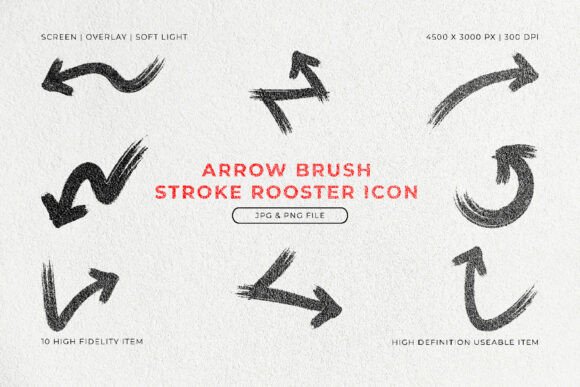
Arrow Brush Stroke Icon Set for Dynamic Visuals
Directional cues are fundamental in design. They guide the eye, indicate movement, and create a logical flow through information. Yet, the standard arrows found in most software libraries often feel cold, generic, and out of place, especially in projects that lean on a warm, organic, or artistic aesthetic. The Arrow Brush Stroke Icon Set solves this common tension by offering a collection of high-fidelity, hand-drawn strokes that bring personality back to visual navigation. Instead of sterile lines, you get textured, expressive shapes that feel authentic and dynamic.
For both seasoned professionals and casual creators, having access to assets that look like they were made by hand, yet function flawlessly in a digital workflow, is incredibly valuable. This set provides exactly that: a middle ground between raw artistic expression and practical usability.
Why Choose a Brushed Aesthetic Over Standard Arrows?
The primary appeal of this icon set lies in its organic texture. Standard vector arrows are mathematically perfect, which can sometimes make a composition feel stiff or overly corporate. Brush strokes, on the other hand, introduce a tactile, human quality. They convey energy, speed, and a sense of deliberate craftsmanship. When you drop one of these strokes into a poster or a social media graphic, it immediately catches attention because it doesn't look like a generic shape.
Beyond the aesthetic, the Arrow Brush Stroke Icon Set is built on solid technical foundations. Each of the 10 unique strokes is crafted at a resolution of 4500 × 3000 pixels with a 300 DPI. This means they are print-ready and will remain crisp even when scaled up for large banners or down for intricate interface details. The high fidelity ensures that the rough, textured edges you see on screen are exactly what you get on paper, minus any pixelation or compression artifacts.
This combination of visual warmth and high resolution directly supports common creative goals: you want your work to stand out, look professional, and communicate without clutter. This set delivers on all fronts.
Practical Uses Across Creative Projects
Versatility is a key strength of any good design asset. These arrow brush strokes are not limited to one niche or style. Their bold, textured look adapts surprisingly well to a wide range of contexts, from digital marketing to printed collateral.
Guiding the Eye in Infographics and Presentations
Infographics rely on clear visual hierarchies. Using a textured arrow makes it easy to lead a reader from one data point to the next. Instead of a flat, boring arrow, you can use a stroke that feels like it was painted on canvas. This adds depth to an otherwise flat digital document. In slide presentations, these arrows can emphasize growth, trends, or sequential steps. They act as visual anchors that break up text-heavy slides, making your information more digestible and engaging for the audience.
Adding Character to Social Media Graphics
Social feeds are crowded. To stop a user from scrolling, you need something that feels a bit different. A hand-drawn arrow brush stroke icon works exceptionally well for calls to action. Whether you are pointing towards a "Sign Up" button, a sale banner, or a product highlight, the raw texture of the stroke adds a layer of authenticity. It suggests a hands-on, creative approach rather than a corporate template. You can easily layer these PNG files over photographs or solid backgrounds to create striking Instagram stories or Pinterest pins that have a unified, artistic feel.
Making an Impact in Print and Branding
For print projects like flyers, posters, and zines, the physical texture of the brush stroke really shines. Because the files are set at 300 DPI, you don't have to worry about blurry results. Small businesses and entrepreneurs can use these strokes for branding elements, such as accent marks in logos or directional cues on packaging. If your brand identity leans towards the handmade, rustic, or avant-garde, this set offers an easy way to incorporate a consistent brushed effect without needing to source expensive custom lettering or illustration work.
Exploring the Technical Side: What You Get
Understanding a few key technical aspects can help you feel more confident using any digital asset. The Arrow Brush Stroke Icon Set is designed to be as straightforward as possible for beginners while still meeting the demands of advanced users.
High Resolution for Flexible Scaling
The 4500 × 3000 pixel resolution is generous. It means you can take a single arrow and place it on a large poster without it breaking apart. At the same time, you can scale it down to use as a small accent icon, and it will remain sharp and clear. This flexibility is essential if you are working on a variety of projects and don't want to manage multiple sets for different sizes. You get the full versatility from one, well-crafted source.
Understanding JPG and PNG Formats
Including both JPG and PNG formats caters to different workflow needs. The PNG format is particularly useful because it supports transparency. You can place the brush stroke over any colored background or photograph, and it will sit perfectly on top without a white box around it. This is ideal for layered compositions. The JPG files offer a smaller file size for quick mockups or for situations where you don't need a transparent background. No matter which format you use, the handcrafted detail and crisp edges are preserved.
Getting Started: Simple Tips for Beginners
If you are new to working with premade design assets, you will find this set very forgiving. The "easy to use" nature is a deliberate part of its design. It works with just about any graphic editing software, from industry standards like Adobe Photoshop and Illustrator to free alternatives like GIMP or online platforms like Canva.
A good starting point is to simply drag a PNG file onto a background you are already working with. Experiment with scale and placement. Because the strokes have a bold, textured look, they often work best when given a little space to breathe. Try placing one arrow as a central focal point rather than crowding it with too many elements. You can also adjust the color of the stroke in your editing software to match your brand's palette, ensuring it integrates seamlessly into your overall design language.
Consider the mood you want to set. A single, sweeping brush arrow can convey speed and momentum. A thicker, more solid stroke can imply stability and direction. The 10 unique variations give you a reliable vocabulary to draw from as you build your visual narrative.
Ultimately, the value of a resource like the Arrow Brush Stroke Icon Set is in how it removes friction from the creative process. You get the immediate visual impact of a hand-drawn element without the time commitment of creating ten unique brush strokes from scratch. It allows you to focus more on the composition and message of your project, knowing you have a reliable, high-quality asset at your disposal that adds genuine character and clarity.