Digital Charm for Your Craft Projects
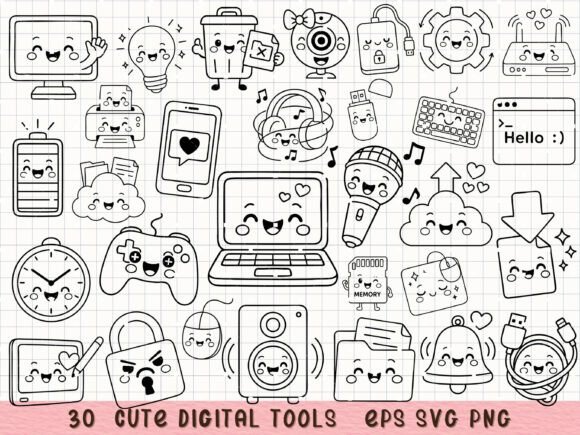
There is something genuinely appealing about mixing technology with a friendly, approachable aesthetic. Cute Digital Tools SVG Tech Clipart delivers exactly that — a thirty-piece collection of kawaii-style tech items that transforms cold, functional gadgets into warm, character-filled illustrations. Whether you are designing planner stickers, building classroom visuals, or cutting custom decals with your Cricut, this set offers a refreshing way to bring personality into your digital and physical projects.
The collection includes computers, smartphones, USB drives, microphones, game controllers, fluffy clouds, and more — all rendered in a consistent line art style that feels both playful and polished. The rounded forms, soft curves, and friendly expressions turn everyday technology into something you actually want to look at and interact with. That is the core appeal here: it takes the familiar and gives it a heart.
What Makes This Collection Stand Out Visually
Kawaii design relies on simplicity and emotional warmth, and this set follows that tradition beautifully. Each icon is clean, with balanced line weights and a deliberate lack of clutter. The line art style means you can scale these images up or down without losing clarity, and the transparent PNG versions give you flexibility for layering over backgrounds, photos, or patterns.
The personality of this clipart leans friendly, curious, and slightly whimsical. A laptop might have tiny eyes and a little smile. A game controller looks ready for fun rather than competitive intensity. A microphone seems eager to be used. These small touches make a real difference when you want to communicate approachability or playfulness in your work.
From a design perspective, the consistency across all thirty items is worth noting. The stroke widths match, the level of detail stays uniform, and the overall style feels cohesive. That matters when you are building a set of stickers, a digital notebook page, or a classroom infographic — you want everything to feel like it belongs together.
Where This Clipart Works Best Across Projects
The versatility of Cute Digital Tools SVG Tech Clipart becomes clear once you start thinking about all the places tech imagery appears. Here are a few areas where this collection genuinely shines:
Planner Stickers and Digital Notebooks
If you create printable or digital planners, you know how much a small illustration can define a layout. These tech icons work beautifully as accent stickers for tracking screen time, logging work tasks, or marking digital appointments. The kawaii style keeps your planner feeling light and motivating rather than clinical.
Cricut and Silhouette Projects
The SVG format is ready to import into Cricut Design Space and Silhouette Studio. You can cut these designs from adhesive vinyl for laptop decals, water bottles, notebook covers, or gadget cases. The clean line art cuts cleanly, and the simple shapes weed easily — two practical advantages for anyone who has spent time struggling with overly detailed cut files.
Classroom Visuals and Teaching Aids
Teachers and educators will find these icons useful for building flashcards, digital lessons, or printed handouts about technology. A friendly computer illustration makes a lesson about internet safety or typing skills feel less intimidating for younger students. The same applies to library signage, STEM activity sheets, or classroom procedure posters.
Sublimation on Mugs, Totes, and Cases
Sublimation printing rewards designs with clean lines and good contrast. This clipart works well on light-colored mugs, tote bags, phone cases, and fabric items. The kawaii style appeals to a broad audience — from teenagers to adults who appreciate a touch of charm in their everyday accessories.
Scrapbooking and Memory Keeping
Tech items appear in our daily lives more than ever, and including them in scrapbook layouts or memory books feels honest and contemporary. A page about a virtual game night, a new phone, or a favorite playlist becomes more visually interesting with these small, friendly illustrations.
Infographics and Digital Content
Bloggers, content creators, and small business owners can use these icons to break up text-heavy pages or add visual interest to social media graphics. A list of tech tips becomes more scannable when each point has a matching icon. That is a small change, but it can meaningfully improve reader engagement.
How This Clipart Influences Brand Perception and Audience Connection
Visual consistency across your materials builds recognition. When you use a recognizable style — such as the kawaii line art found in Cute Digital Tools SVG Tech Clipart — your audience starts to associate that friendly look with your brand or content. Over time, that association creates trust and familiarity.
The emotional tone of your visuals also affects how people interpret your message. A smiling computer or a cheerful microphone signals that your brand is approachable, human-centered, and not taking itself too seriously. That works especially well for creators, educators, and small businesses that want to feel accessible rather than corporate.
Readability and visual hierarchy improve when you use consistent iconography. Icons act as visual anchors that guide the eye through a layout. A reader scanning a page of text will pause at an icon, and that pause can be the difference between them skimming past your content or actually engaging with it. The key is to use icons intentionally — as signposts, not decoration.
For brand identity work, this clipart can serve as a starting point for a larger visual system. The style is distinctive enough to be memorable but simple enough to pair with other design elements. You could build an entire brand vocabulary around this aesthetic if it fits your audience and message.
Practical Guidance for Choosing and Using This Collection
Before you download and start using any design asset, it helps to think through a few practical considerations. Here is what I would recommend based on experience working with similar clipart collections:
Evaluate Your Project Fit
Ask yourself whether the kawaii style matches the tone of your project. It works beautifully for casual, friendly, playful, or educational contexts. It may feel out of place in formal corporate presentations, legal documents, or luxury branding. That is not a weakness of the collection — it is about choosing the right tool for the right job.
Test File Formats Early
This bundle includes SVG, PNG, and EPS formats. SVG files are ideal for cutting machines and web use because they scale without quality loss. PNG files with transparent backgrounds work well for quick placement in documents or design software. EPS files give you editable vectors in Adobe Illustrator or CorelDRAW. Test each format in your specific workflow before committing to a large project.
Consider Color and Customization
The line art style gives you a blank canvas for color. You can leave the icons as black line art on a white or transparent background, or you can fill them with your brand colors, gradients, or patterns. The simplicity of the designs means they take color well without becoming muddy or overly busy.
Review Commercial Licensing Terms
This collection is available for both personal and commercial projects. That means you can use it in products you sell — such as printed stickers, digital planners, or sublimated goods. Always double-check the specific licensing details included with your purchase to understand any limitations, such as whether the icons can be resold as standalone clipart or must be part of a larger design.
Think About Readability at Small Sizes
Kawaii line art tends to read well at small sizes because the shapes are simple and the expressions are clear. That said, test your chosen icons at the actual size you plan to use them. A smartphone icon might look great on a poster but lose its eyes and details on a small sticker. Scaling down the SVG version and previewing it before finalizing your design saves you from disappointment later.
Pairing This Clipart with Other Design Assets
Because the style is clean and minimal, Cute Digital Tools SVG Tech Clipart pairs well with a range of fonts and design elements. Here are a few observations from trying it in various contexts:
- Sans serif fonts like Poppins, Montserrat, or Nunito complement the rounded, friendly feel of the icons. The geometric shapes of these fonts echo the clean lines of the clipart.
- Handwritten or script fonts can add a personal, organic contrast to the digital subject matter. A loose brush script next to a kawaii laptop feels contemporary and creative.
- Display fonts with rounded letterforms reinforce the playful personality. Look for options that avoid sharp angles or heavy slab serifs.
- For pairing with other design assets, stick to simple backgrounds — solid colors, soft gradients, or subtle patterns. Busy backgrounds compete with the icons and reduce their impact.
If you are building a brand identity or content system around these icons, consistency is your friend. Use the same stroke widths, the same level of detail, and the same general tone across all your visuals. That consistency is what makes a collection of separate pieces feel like a unified whole.
Final Thoughts on Working with Kawaii Tech Clipart
Design assets like Cute Digital Tools SVG Tech Clipart succeed because they solve a real problem: how to make technology feel human. In a world where screens, devices, and digital tools dominate our daily lives, injecting a little warmth and personality into those subjects can change how people relate to your content.
Whether you are a teacher building engaging classroom materials, a small business owner creating social media graphics, a crafter making custom stickers, or a designer working on digital products, this collection gives you a solid foundation. The thirty items cover the most common tech touchpoints, and the consistent style means you can mix and match freely.
Download the set, open your preferred design software, and start experimenting. Drop a smiling cloud next to a checklist. Place a cheerful microphone beside a podcast episode title. Put a friendly laptop on a planner page for work-from-home days. The small act of adding visual charm to your projects can make a meaningful difference in how they are received — and how much you enjoy making them.